



DIY WiFi Modular Security Camera
Whether you are looking to create a custom surveillance solution or need a discreet way to monitor a specific area, the WiFi Mini Module DIY 1080P HD Camera offers the ultimate flexibility. Designed for versatility, this module allows you to decide exactly how and where the camera is hidden.
From $295.00
To $345.00
In stock
Looking for a security solution that fits exactly where you need it? Our DIY WiFi Camera Module offers the ultimate flexibility for home and office monitoring. Designed for users who need a customizable security setup, this modular kit allows you to integrate high-definition surveillance into your existing environment without the bulk of traditional camera housings.
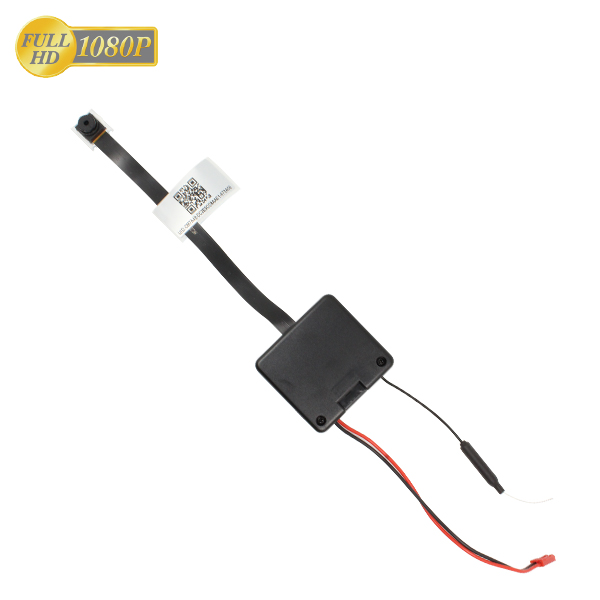
Whether you are monitoring a stockroom, keeping an eye on a home office, or building a custom housing for a nursery monitor, this kit provides the tech—you provide the placement.
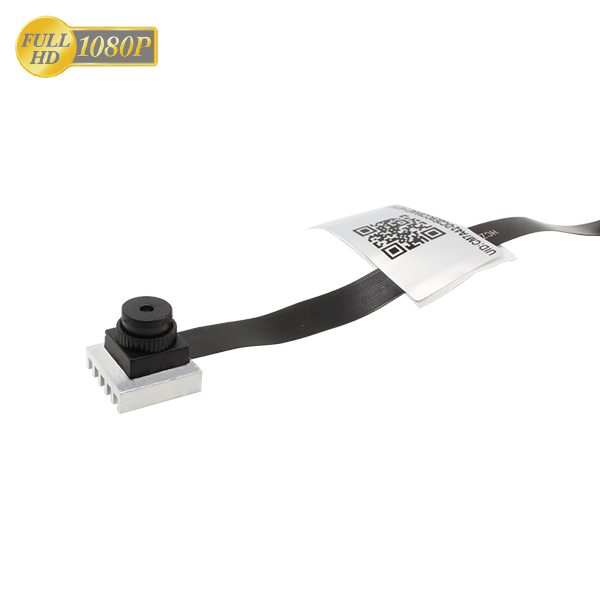
Why Choose a Modular Security Kit?
Standard security cameras don't always fit the aesthetic or physical requirements of every room. This DIY module is ideal for:
-
Custom Integration: Fit the pinhole lens into existing enclosures or discrete locations.
-
Flexible Power: Use the included rechargeable lithium battery for up to 10 hours of mobile use, or connect to the provided Australian 5V USB power supply for 24/7 continuous operation.
-
Dual-Layer Reliability: Even if your local power is interrupted, the internal battery ensures the device continues to function for up to 10 hours.
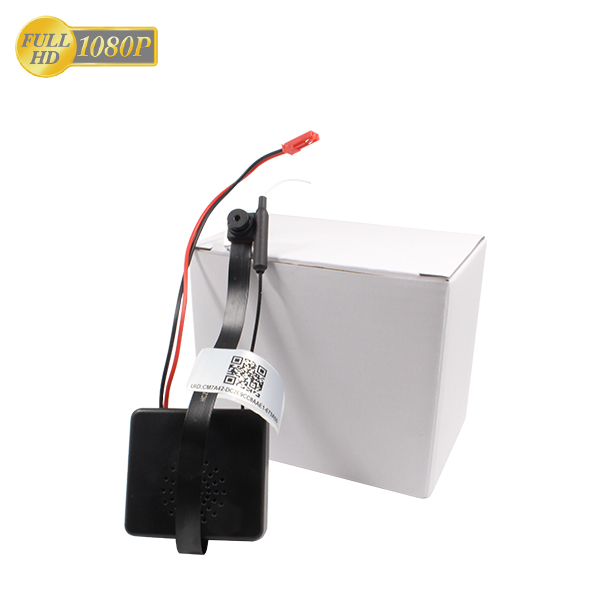
Remote Access & Peace of Mind
Stay connected to your space from anywhere in the world. As long as the module is connected to your local WiFi network, you can access a live feed via our Free App (iOS & Android).
-
Live Remote Viewing: Check in on your property via any web-enabled device.
-
Smart Scheduling: Use the app to arm or disarm the camera during specific hours to suit your schedule.
-
Instant Playback: With an optional Micro SD card installed, you can review time-and-date stamped footage directly from your smartphone.
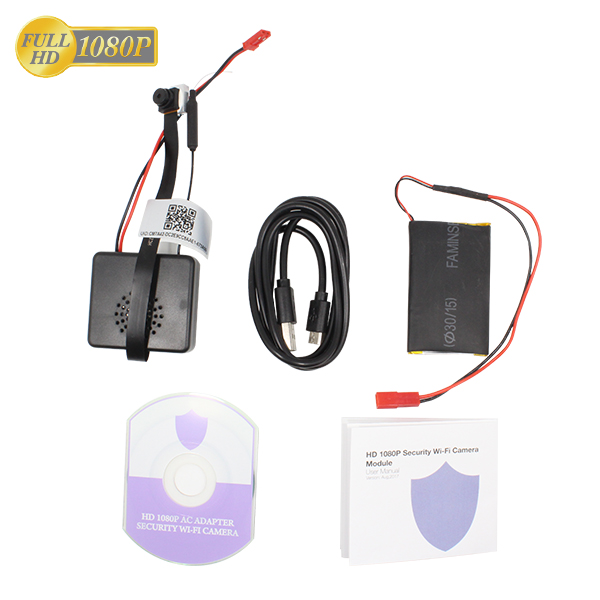
Technical Specifications
Advanced Features
-
Motion Detection: Receive instant push notifications to your phone when movement is detected.
-
Two-Way Audio: High-quality internal components allow for clear communication through the app.
-
H.264 Compression: Optimized video storage for longer recording cycles.
Note: This device is intended for lawful security and monitoring purposes. Always ensure your use of surveillance equipment complies with local privacy laws and regulations.
Remote WiFi Monitoring Module
HD 1080P Wireless Camera Kit
App-Controlled DIY Security
Keep an eye on your property with high-definition live streaming to your smartphone
Battery or mains powered for continuous 24/7 protection. Easy DIY setup via app.
Technical Specifications: VE-Modular 2K Series
DIY Installation Guide: Step-by-Step
1. Preparation & Testing
Before mounting the module into a permanent fixture:
-
Insert the SD Card: Ensure the card is formatted to FAT32.
-
Power On: Connect the battery to the PCB or plug into a USB power source.
-
Initial Sync: Open the Smart App and follow the prompts to connect to your WiFi. Screenshot user manual included.
2. Positioning the Lens
The modular lens is attached via a flexible ribbon cable along with a PIT motion sensor.
-
Avoid Kinks: Do not fold the ribbon cable at sharp 90-degree angles; use gentle curves to prevent data loss.
-
Stabilize: Use a small amount of non-conductive adhesive or a mounting clip to secure the lens head.
-
Field of View Test: Check the live feed on your phone to ensure the horizon is level and the 150° angle covers the desired entry points.
3. Integrating the Module
-
Heat Dissipation: If placing the module inside a custom enclosure (like a 3D-printed case or a hollowed object), ensure there are small ventilation holes. 2K processing generates mild heat.
-
Antenna Placement: Keep the small WiFi antenna away from large metal objects to maintain a strong signal.
4. Configuring Smart Features
-
Motion Zones: In the App, set an "Activity Zone" to avoid false alerts from ceiling fans or pets.
-
Power Management: If using battery power and prioritizing motion-activated recording over constant streaming. Motion uses less memory card storage and easier search options.
1. Why won’t my camera connect to the WiFi?
Most connection issues are solved by checking these three things:
-
Check the Frequency: Eensure your phone is connected to the same network you are trying to pair the camera with during the initial setup. 2.4Ghz is paramount becase 5.0GHz is not supported. Ensure your router is configured to 2.4GHz.
-
Reset the Device: Hold the 'Reset' button for 8–10 seconds until the indicator lights flash. This clears any previous cache.
-
Check Permissions: Ensure the App has "Location" and "Local Network" permissions enabled in your phone settings; these are required for the initial handshake.
2. Why is the live stream lagging or buffering?
-
Signal Strength: In the App, check the WiFi signal percentage. If it is below 70%, consider moving the camera closer to the router or using a WiFi extender.
-
Resolution Settings: If your mobile data (4G/5G) is weak, switch the App view from to "SD" for a smoother real-time stream. The camera will still record in high resolution to the SD card.
3. The SD card isn't being recognized. What should I do?
-
Format Requirement: Use a Class 10 Micro SD card (Max 128GB). Before inserting, format it to FAT32 on a computer.
-
Insert while Powered Off: Always insert or remove the SD card while the camera is turned off to avoid corrupting the file system.
-
App Formatting: Once inserted, go to "Storage Settings" in the App and select "Format" to sync the card to the camera’s internal clock.
4. How long does the battery actually last?
-
Continuous Use: The 5000mAh battery provides approximately 8–10 hours of active daytime streaming.
-
Pro Tip: For 24/7 security, keep the device plugged into the provided 5V USB adapter.
5. Why am I not getting Motion Alerts on my phone?
-
Enable Push Notifications: Ensure notifications are turned "ON" both within the App settings and your smartphone's main notification settings.
-
Sensitivity Levels: Adjust the motion sensitivity to "Medium" or "High" in the App.
-
Battery Optimization: On some Android phones, "Power Saving Mode" may kill background apps. Ensure the App is allowed to "Run in Background."
Support Note: If you've followed these steps and the LED indicator remains off, check that the battery connection clip is firmly seated on the PCB (for modular models) or that the USB cable is fully inserted.
This DIY WiFi Camera Module is designed and intended solely for lawful home security, property monitoring, and personal DIY projects. The use of surveillance equipment is subject to federal, state, and local laws.
-
Consent: It is the user's responsibility to ensure that any video or audio recording complies with privacy laws, including obtaining necessary consent where required.
-
Prohibited Use: This device must not be used for the purpose of surreptitious recording of individuals in locations where a reasonable expectation of privacy exists.
-
Compliance: By purchasing this product, the buyer agrees to use the device in a lawful manner and assumes all liability for its application.
| By Order | No |
|---|